SpellChecker
4.01 build 161
[09/17/2017] SpellChecker
4.01 build 161
[09/17/2017]
|
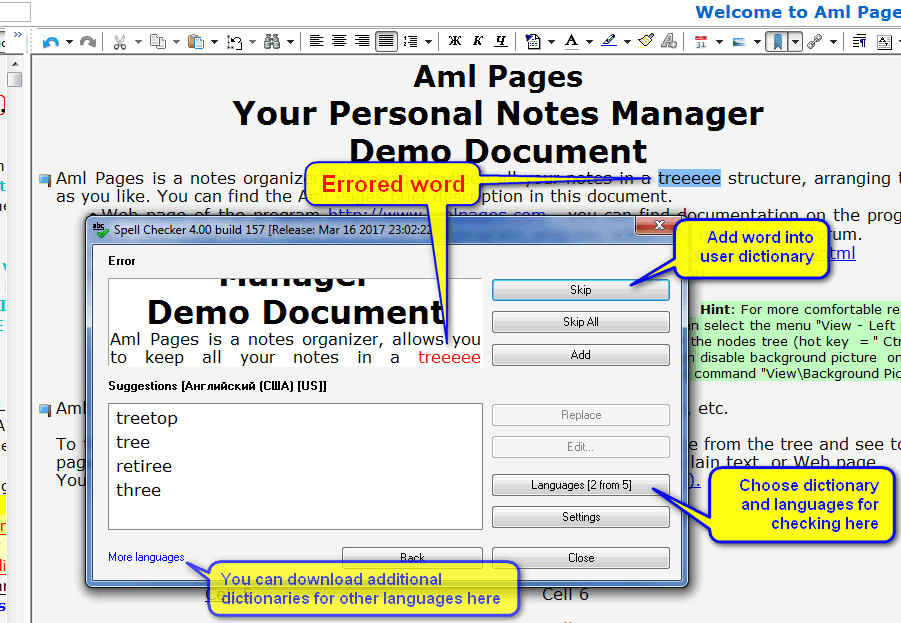
Spell Checker plugin for Aml Pages.
This plugin implements the spelling in documents of Aml Pages. Supports simultaneous check in multiple languages. Includes spell checker dictionaries for English (USA+British), German, Ukrainian and Russian languages. The remaining dictionaries can be downloaded by clicking on the link in the window of this plugin.
See command on this plugin in menu "Plugins\Spell Checker" (or context menu for text editor).
Setup: standard.
Required Aml Pages 9.31 build 2256 or later
How to install additional dictionaries for other languages
- Visit to web site on hyperlink "More languages" from plugin window.
- Download XPI-file for Your language.
- Rename the file from *.XPI to *.ZIP.
In fact this file in ZIP-format.
- Extract all files *.aff and *.dic from ZIP-archive to directory of Aml Pages plugins.
As default the directory is %PATH_TO_AML_PAGES%\Plugins,
e.g. "C:\Program Files\Aml Pages\Plugins".
- Choose Your language from button "Languages".
- Restart the Spell Checker plugin.
Request the custom development of this plugin or features
|
Click to enlarge
Request the custom development of this plugin or features
|
Data Saving to Aml Pages documents
You can use of AmlDataSender Library for data saving to Aml Pages documents. AmlDataSender.DLL is the COM object. ZIP-archive include samples on C++ (MFC, WinAPI), Visual Basic (VB6, VB.Net), Delphi (thanks to Sergey Puchovsky).
Download: AmlDataSender.zip
[
zip, 120K
]
See also
For developers
-
 Aml View for Total Commander & Aml Pages Viewer
2.02
[12 июня, 2016]
Aml View for Total Commander & Aml Pages Viewer
2.02
[12 июня, 2016]
-
The plugin for viewing of Aml Pages documents in Total Commander (the lister plugin). Also may to work as standalone viewer for Aml Pages documents (see the file AmlPagesViewer.exe).
User Interface: English, Deutsch, Russian, Spanish, French, Hungarian, Bulgarian, Ukrainian, Romanian.
Installation:
- In Total Commander: click on the ZIP-archive in Total Commander and confirm installation.
- For viewing: unpack all files from the ZIP-archive and start AmlPagesViewer.exe.

| |
-
 Aml2Dropbox
2.71
[02/08/2025]
Aml2Dropbox
2.71
[02/08/2025]
-
Instantly synchronize your documents created with Aml Pages and create backups in your Dropbox folder, so that you have the files at hand anytime you need them.
Plugin to synchronize documents via an Internet using the service www.dropbox.com. Dropbox - the Web service to synchronize files via an Internet.
What is Dropbox? See the article about this service in Wikipedia.
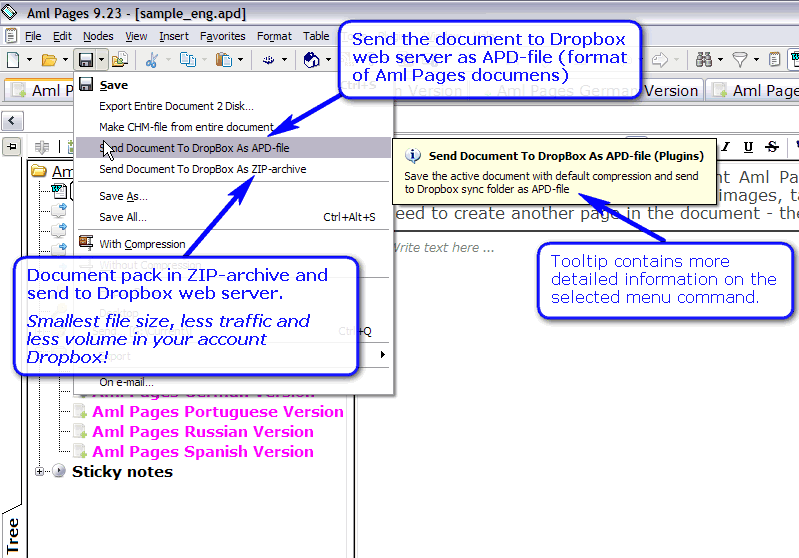
With a single click you can send the currently opened document to the Dropbox folder either as APD file (the proprietary format of Aml Pages) or as a ZIP archive. The latter option instructs Aml2Dropbox to automatically generate the archive before sending it to the Dropbox directory.
Click on a menu command, the rest of the plugin itself does: saves the document with date compression, packed into ZIP-archive, sends data to a folder synchronization Dropbox. The plugin allows you to start synchronization with the service Dropbox, or visit to the website service.
Commands like the plug is always on the menu "Plugins". Also sending embedded commands in the menu "Save" (see screenshot at right).
Installation: standard way via open ZIP-archive of plugin from Aml Pages. Or extract all files from ZIP-archive to Aml Pages plugins directory.
Required Aml Pages 9.34 or later
See also
How to synchronize documents via Internet
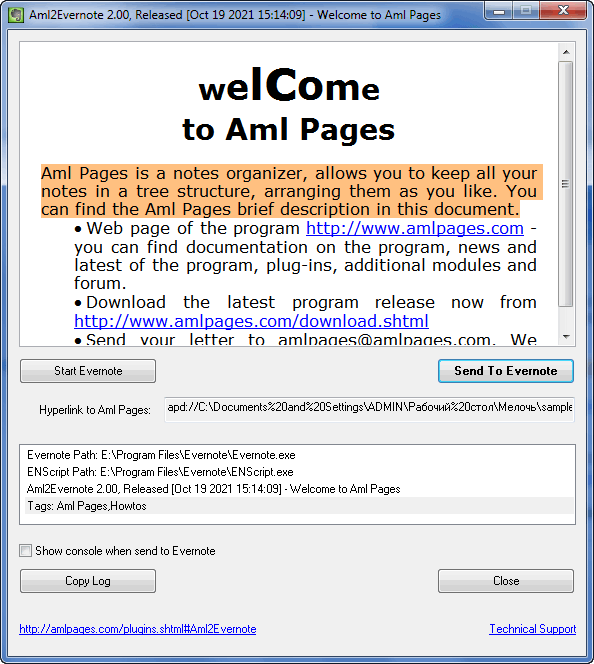
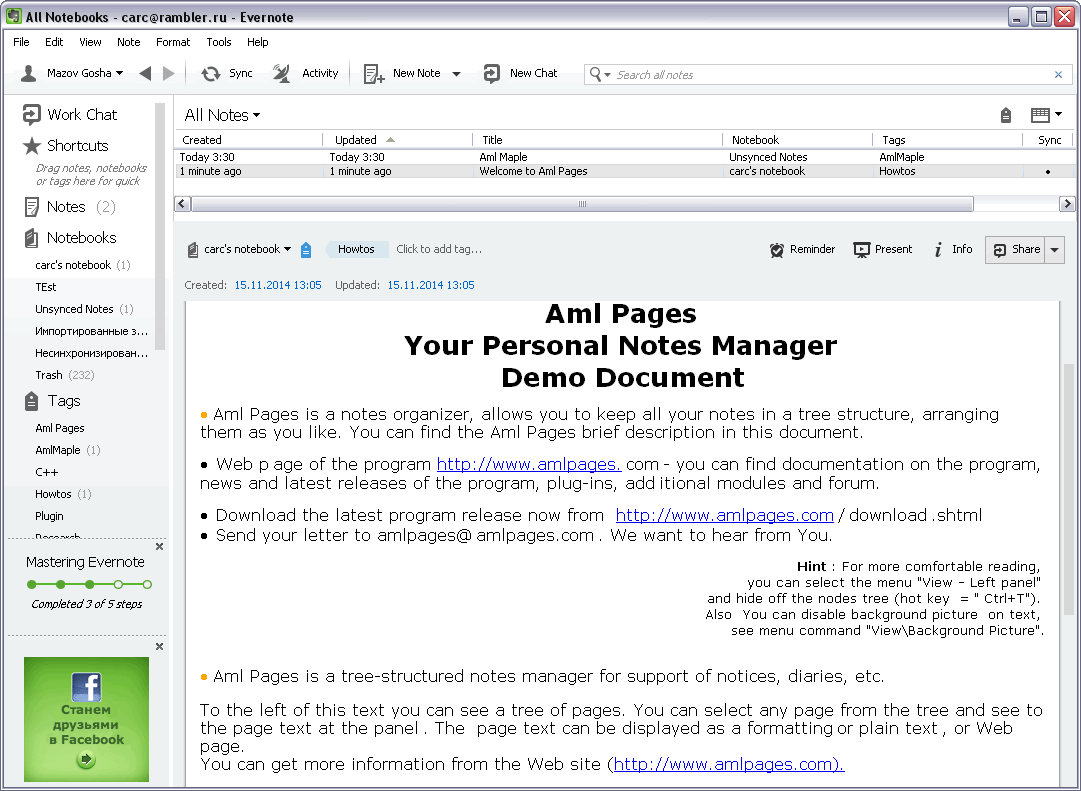
Pluigin Aml2Evernote
|
|
Request the custom development of this plugin or features
-
 Aml2Evernote
2.01
[23/11/2021]
Aml2Evernote
2.01
[23/11/2021]
-
Request the custom development of this plugin or features
-
 Aml2CHM
3.50 build 152
[18/02/2024]
Aml2CHM
3.50 build 152
[18/02/2024]
-
The plugin create e-book (HTML Help, format of Windows help system) from Aml Pages documents. The plugin support extended export to HTML with formatting saving and pictures.
How to install plugin see here.
Required Aml Pages Aml Pages 9.96 build 2884 or later..
Screenshot: new window
Video tutorial: see here
[
zip, 1.6M
]
Request the custom development of this plugin or features
-
LogView
1.08 build 78
[04/12/2024]
-
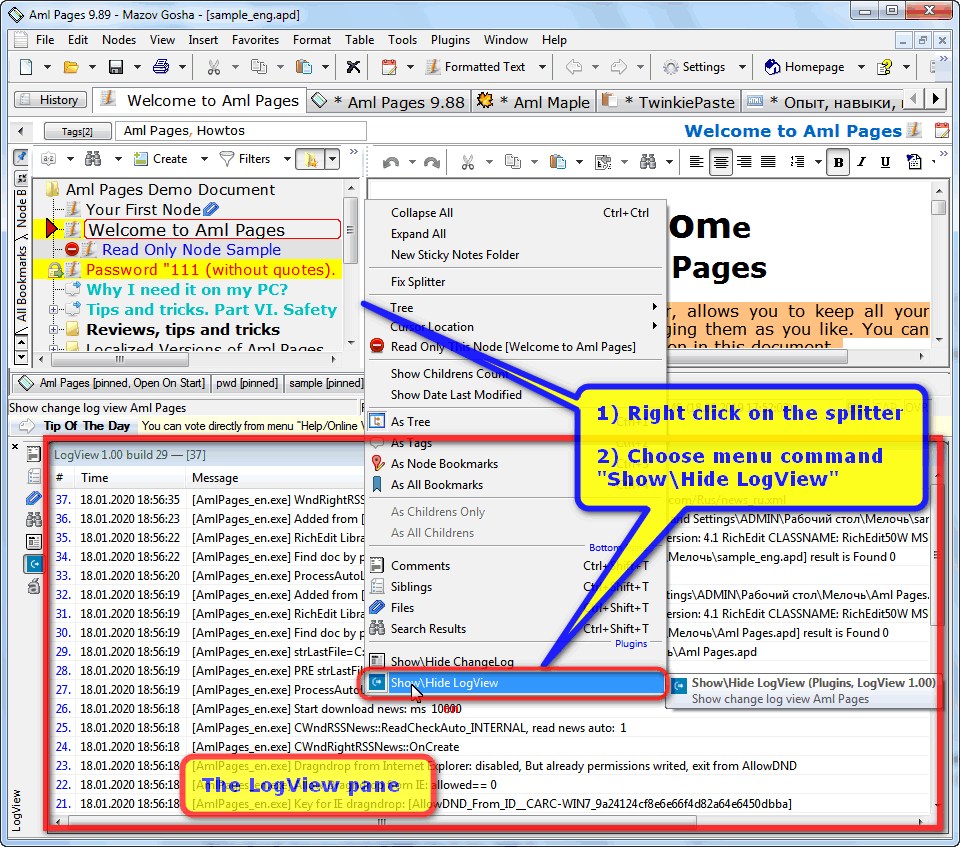 This is the plugin for viewing of log Aml Pages.
The setting "Write log file into program folder" must be enabled on the tab Settings\Usability.
How to install plugin see here.
Required Aml Pages 9.88 build 2796 or later.
Request the custom development of this plugin or features
-
 ImagesIntoHTML
2.00
[01/05/2012]
ImagesIntoHTML
2.00
[01/05/2012]
-
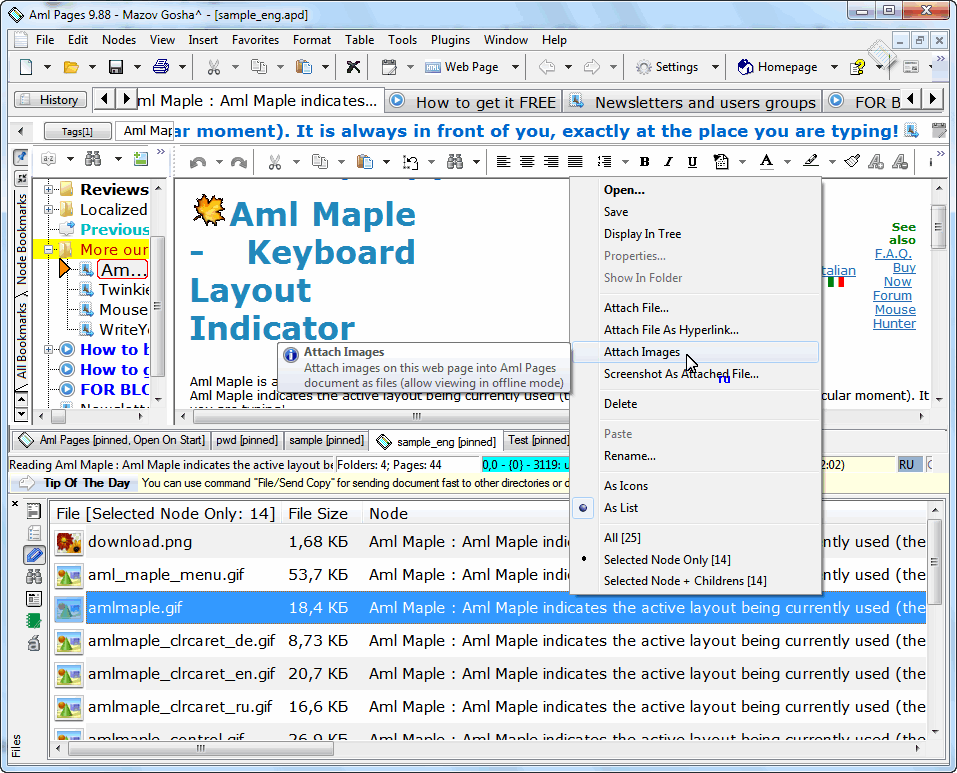
The plugin save images of web page into document Aml Pages. With this plugin you can include images from Web pages within a document. So images will be available for viewing without connecting to the Internet.
See command on this plugin in menu "Plugins\ImagesIntoHTML".
Setup: extract all files from ZIP-archive to Aml Pages plugins directory.
Required Aml Pages 9.35 build 2288 or later
Request the custom development of this plugin or features
-
 IE2Aml
[13/12/2011]
IE2Aml
[13/12/2011]
-
The plugin execute of fast data saving from Internet Explorer & Maxthon to Aml Pages documents.
Screenshot: here
PAD file: here
formerly known as iAml One Click
Request the custom development of this plugin or features
-
Themes
4.01
[18/02/2017]
-
The plugin is for management (and creation) of visual themes for Aml Pages. Also included samples of themes. For using see to menu "View\Themes".
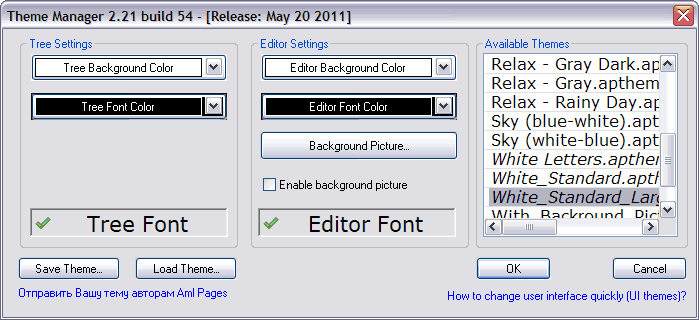
Learn more about using of this plugin
Request the custom development of this plugin or features
-
 Aml2LeaderTask
2.00
[25/11/2022]
Aml2LeaderTask
2.00
[25/11/2022]
-
Plug-in for integration Aml Pages and organizer LeaderTask.
LeaderTask - is a business organizer for planning tasks and project management.
The plugin allows you to literally one click to keep the problem from Aml Pages in the database LeaderTask. It's simple:
•
Select text in Aml Pages and select the menu command "Plugins\Save Text To LeaderTask" (or from the context menu).
• The selected text is saved as a new task in LeaderTask.
Next time, in a window in the panel LeaderTask Navigator activate the tab "Planning" and go to your In (inbox). Observe all stored in the task list.
Starting with version LeaderTask 6.8.7.1 there is quicker access to your Inbox: This command menu "View \ Inbox" or keyboard shortcut Ctrl + Q.
Screenshot: see here
Required version of Aml Pages 9.16 build 2104 or later.
Request the custom development of this plugin or features
- File2Aml
2.04
[25/02/2015]
-
The plugin attach of files to Aml Pages documents. The plugin required Aml Pages 9.01 Beta 2 or later.
Request the custom development of this plugin or features
-
 Aml Assist
3.61
[30/09/2024]
Aml Assist
3.61
[30/09/2024]
-
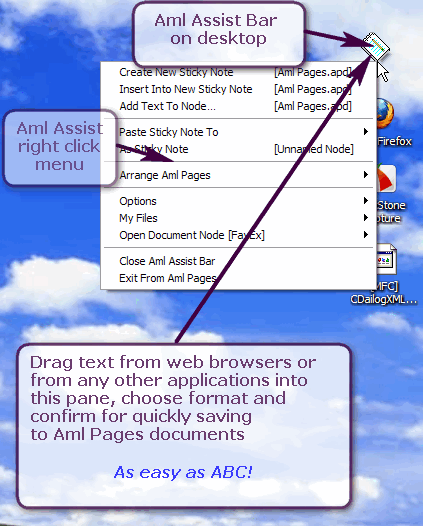
The plugin save of web pages, text and files from
Internet Explorer,
Mozilla Firefox, (see video tutorial)
Maxthon,
Microsoft Word,
OpenOffice.org,
Microsoft Outlook,
Apple Safari,
Google Chrome,
The Bat,
Windows Explorer,
Total Commander,
HippoEdit,
Evernote,
Microsoft Visual Studio
and from any applications.
- Select data in source application (e.g. text, tables, or pictures in web browser, MS Word, file in file manager).
- Drag selection to Aml Assist pane (see screenshot or screenshot
and demo video. More info see in review "Tips and tricks. Part VII. Aml Assist". Note: This plugin works integrated with FavEx.
Required version of Aml Pages 9.31 build 2254 or later.
Request the custom development of this plugin or features
| |
-
Placement Restorer
[01/06/2014]
-
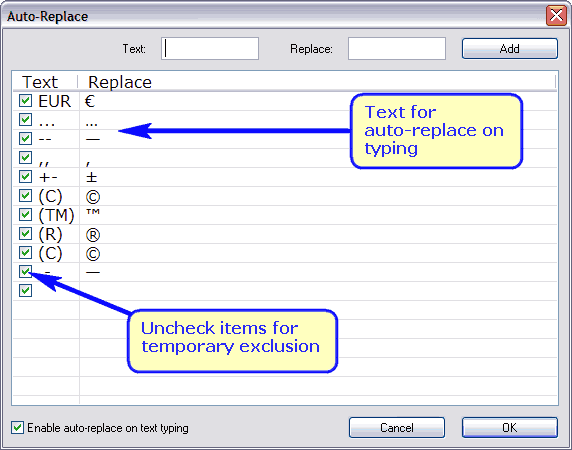
The plugin save and restore placement of Aml Pages main window. See menu commands on submenu "Plugins\Placement Restorer" (or submenu Tools).
See command on this plugin in menu "Plugins\Placement Restorer".
Setup: extract all files from ZIP-archive to Aml Pages plugins directory.
Required Aml Pages 9.12 or later.
Request the custom development of this plugin or features
Recommended Aml Pages v. 9.44 build 2382 or later (for auto save\restore of position).
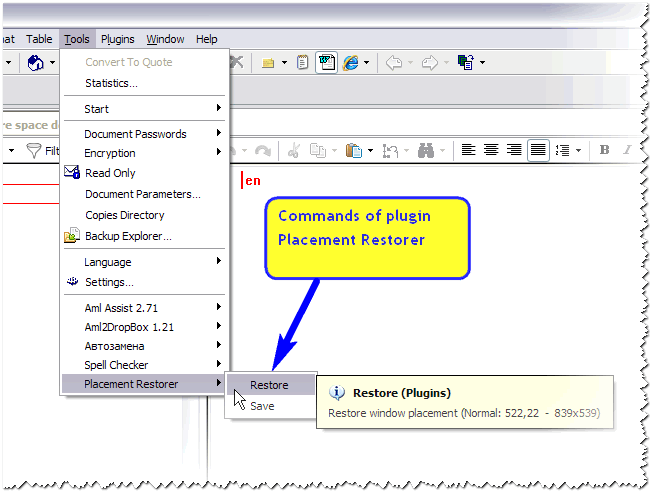
Click to enlarge
- Aml Export
3.09
[11/03/2017]
-
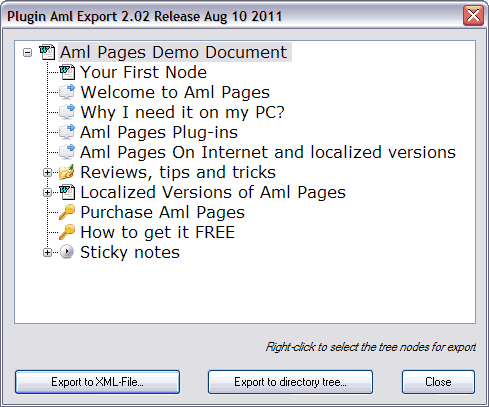
Export Aml Pages document: 1) into a tree of folders and files; 2) into XML-file.
 Request the custom development of this plugin or features
-
Aml Auto Completion
2.10
[28/10/2023]
-
Text auto completion plug-in on typing.
The plug-in required Aml Pages 9.08 build 1997 or later. Screenshot.
Setup: extract all files from ZIP-archive to Aml Pages plugins directory.
Required Aml Pages 9.08 build 1997 or later
Request the custom development of this plugin or features
-
Aml Shortcut
1.01
[15/04/2009]
-
Plug-in for creation of shortcuts to direct access of Aml Pages nodes. Click on the shortcut and you will see it your node of Aml Pages document. See commands of this plug-in in menu "Plugins\Aml Shortcut".
Required version Aml Pages 9.10 build 2020 or later.
Request the custom development of this plugin or features
-
Aml Image
2.10
[14/12/2014]
-
The plugin insert any picture to text. The plugin support formats: JPEG, GIF, Ping, TIFF, Bitmap, Icon, Windows Metafiles, Enhances Metafiles and etc.
The plugin required Aml Pages 9.05 build 1966 or later and Win2K\XP or later.
Setup: extract all files from ZIP-archive to Aml Pages plugins directory.
Request the custom development of this plugin or features
- FavEx
3.11
[01/12/2014]
-
This plugin extends the features of the Favorites menu. The plugin opens the parts of any document in just one click. Note: This plugin works integrated with Aml Assist.
Screenshot 1: Favorites menu extended by FavEx plugin.
Screenshot 2: commands of FavEx on menu Aml Assist bar.
Required Aml Pages 9.22 build 2177 or later.
Request the custom development of this plugin or features
- Aml2Pic
1.0
[22,09,2007,21,50]
-
The plugin save text to picture files (extended metafiles). The plugin is distributed with source code (based of Microsoft sample).
Request the custom development of this plugin or features
- Para
[01.03.2007]
-
Paragraph formatting. The plugin is distributed with source code.
Request the custom development of this plugin or features
- Quotes Auto Completion
1.00 [04.02.2007]
-
Automatically insert double or single back quote markes. The plugin is distributed with source code.
Request the custom development of this plugin or features
- Table Maker
1.02
[13/07/2008]
-
This is a sample plugin for tables creation. The plugin is distributed with source code.
Request the custom development of this plugin or features
See also
Plugins Installation
|
What is Aml Pages
|
Technical Support
|
Facebook Group
|
Telegram Group
|


 News
News 






 VK
VK Блог
Блог
 Plugins for Aml Pages notes manager
  how to install a plug-in? »»»