|
Aml Pages is tree-like notes organizer for Windows. It contains all your notes, information, web pages, passwords, URL-address in the form of a tree, so you can quickly find what you need. The Aml Pages can easily save web pages (or fragments) from the Internet and provides a sticky for quick notes. Manage megatons of your notes with ease at work and at home.
Support plain text, rich text and web pages, tables and figures, attachments, and many plug-ins for expansion features. At any moment you can instantly record the important information in a sticky note, not looking up from the important cases.
Aml Pages allows you to store absolutely any information in its database: texts, images, screenshots, files, URLs and etc. Moreover, you can store both links to files and files themselves.
|
|

Tree-like notes
Text and paragraph formatting
Images, screenshots capture, tables
Quicky text and web grabbing
Security and documents auto-backup
Text bookmarks and hyperlinks
Many free plugins
|
|
|
Demo video
|
|
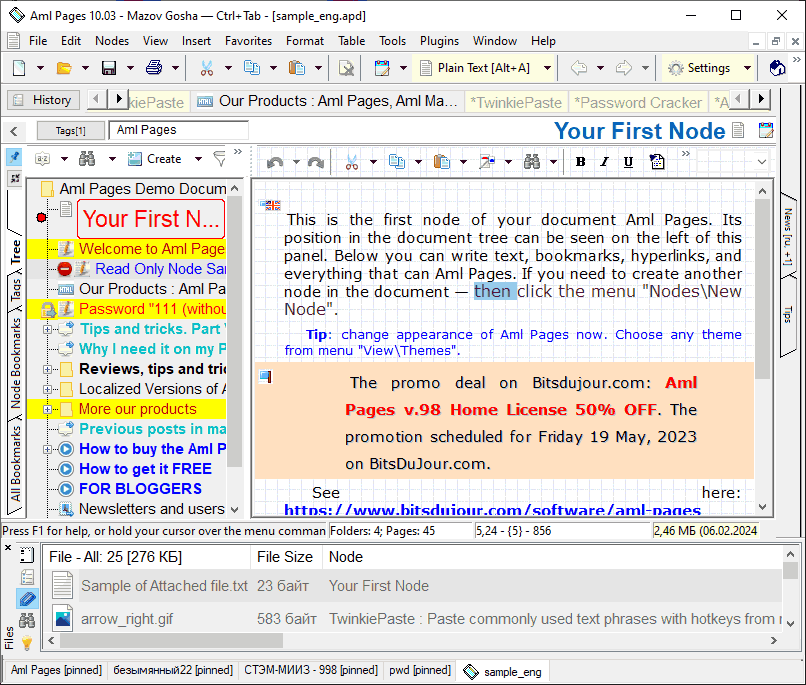
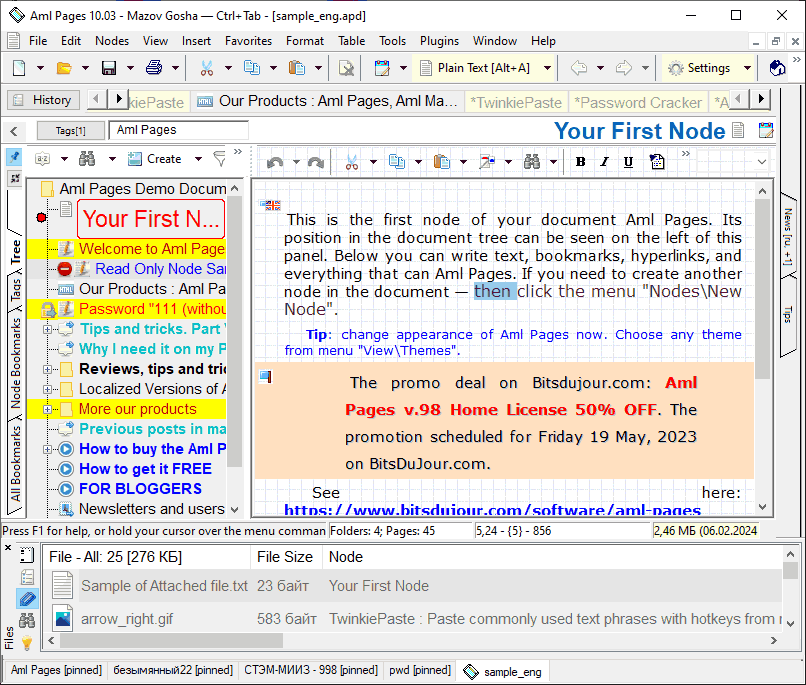
Displaying notes in the form of a tree
• Flexible tree structure to keep all your notes in order. You can set up various attributes of node: colors, icons, fonts, sort order and etc.
• Any section of the document you can assign your own category (tag) that will facilitate its search.
You can also view the entire document as a simple list of nodes. This method allows you to easily find the most-most sections (new or old, big or small, etc.)
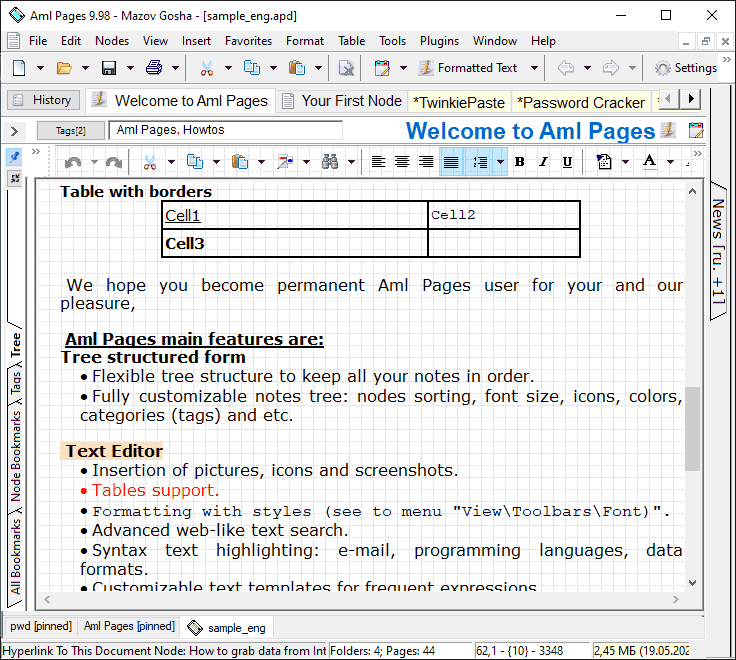
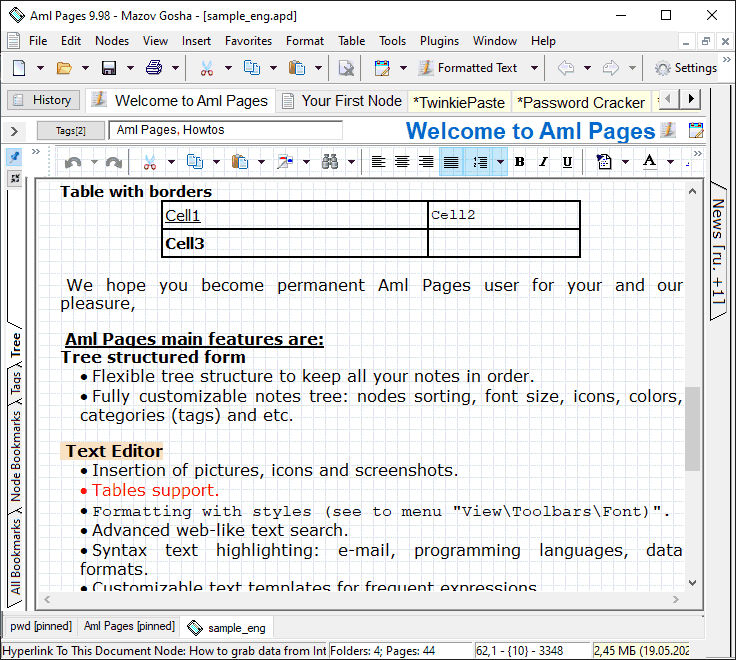
Text formatting
• Text and paragraph formatting functions like in WordPad.
Inserting tables and figures, hyperlinks and lines, date and time in any format.
• You can also capture screenshots of any area of the screen directly from the Aml Pages.
• Insert hyperlinks, emails, addresses into text. All the standard URLs the Aml Pages highlights automatically and allows them to open a web browsers, email clients, and other applications.
|
Easily text and web mining
• Can clip text from anywhere. Just select it and press the hotkey! It works in Microsoft Word, Internet Explorer, Outlook, Opera, Mozilla Firefox, OpenOffice.org, Acrobat Reader, Windows HTML Help and etc.
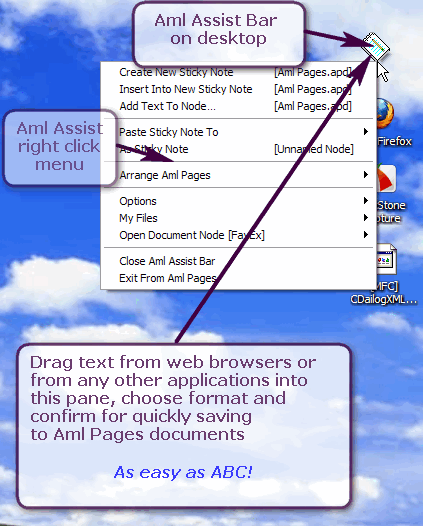
• One of the most "mighty" features of Aml Assist is support of dragging different stuff to its panel. You can drag some text from editors (Word, OpenOffice.org); whole web pages or their parts from all popular web browsers.
|
|
Instant search
Aml Pages offers advanced powerfull search in all parts of the document — individual nodes, branch or whole document with many options. Many search parameters can be set, for example - when data was added or updated, user nodes categories, data types, where search should be performed, search for whole word, including or excluding HTML code analysis and many more.
|
Filtering notes
Иногда нужно найти все разделы документа по какому-либо менее формальному признаку: дата изменения, заголовки, пометки, по типу представления данных и.т.д. В этом Вам помогут Фильтры разделов: включите любой из фильтров, и в дереве будут отображаться только разделы, соответствующие условию. Остальные разделы будут временно скрыты, не отвлекая Вас от анализа нужных разделов.
Именно временно скрыты! Все Ваши данные остаются в целости и сохранности. Просто не нужные сию секунду разделы не будут "маячить" у Вас перед глазами.
Понадобится более сложный фильтр? Все настройки доступны: используйте любые сочетания условий.
Работаете с документом в режиме фильтра, и перешли на раздел документа, не включенный в фильтр?
Aml Pages автоматически отобразит его в дереве. Если пользователь перешел на этот раздел, значит он ему нужен - почему бы его и не отобразить сразу? Фильтры — это не формальные конструкции, это комфортные приемы работы с документом. ("здесь вам не SQL! долой формальности - да здрям удобство!" ©).
|
Text Bookmarks
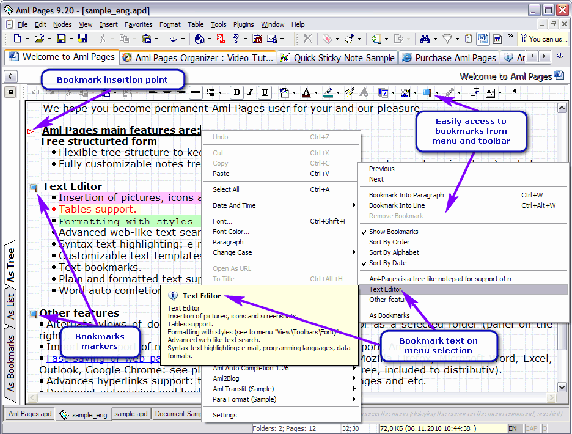 •
• Sometimes it is necessary to quickly locate a particular piece of text. Check this snippet bookmark, and it will not be lost. Bookmarks show the markers in the text, and there are different ways of navigating through tags: toolbar button, context menu, text editor, or key combination Ctrl+Ctrl - choose any.
• Special panel allows you to "overlook" all bookmarks of the document at once. Rate it: one click and you instantly go to that section and directly to specific pieces of text. Mark important text - interesting thoughts and facts, unfinished text fragments that you want to come back later i.t.p - then switching to the panel Bookmarks you browse a complete list of them.
• No important detail is now no longer elude your attention. Sorting options allow you to place tags at any time in the correct order: alphabetically, by date, by location in the text.
You can create a hyperlink from any part of the document to the bookmarks. Also open a hyperlink to the bookmarks can be from other applications and web browsers.
|
Security and data backup
Providing information security. Aml Pages protects data by limiting access to the program with passwords. It is also possible to back up data.
В Aml Pages встроены средства автоматического сохранения изменений, как по прошествии интервала времени, так и при выполнении определенных действий пользователем. Вам больше не придется терять данные, даже если компьютер «завис намертво».
Развитые возможности резервного копирования позволяют жить спокойно. В любой момент можно создать резервную копию «ручками» или отправить копию документа на внешний носитель.
При сохранении документа Aml Pages автоматически создаст резервную копию предыдущей его версии. Если Вы случайно удалите важные данные, Вы всегда сможете восстановить их из резервной копии.
Если документ защищен паролем, то Aml Pages защитит и резервную копию. Так что идея «порыться» в резервных копиях без Вашего ведома ни к чему не приведет. Копии защищены как и сам документ.
|
Import and export
• You can import both files and folders. At any time you can export a section of a file or a node in the tree of folders and files.
• Aml Pages supports the development of drag-n-drop. Drag files, folders, pictures, text in an application.
• Create sticky note and easily save text to nodes by right click on Aml Assist pane.
|
??????????????
|
|
Format Styles, syntax highlighting, text
•
Easy to use formatting styles can instantly draw the text at the appropriate sample.
Click on the style from the drop-down list, and you're done - the selected text or the current paragraph is transformed: change color, fonts, formatting attributes.
It took your style? It's easy! Format the text, bring up a similar form, and selects the "Create from the text. You're done!
The application supports syntax highlighting of data formats, and many programming languages: e-mail quotes, C++, Visual Basic, Java, HTML, Pascal, and many others.
• Use text templates for quickly insertion of frequently used words and phrases.
•
Auto-completion helps typing quickly. This is trivial: you type, the application itself analyzes the text and offer you completion options.
You can also add words manually.
|
Many free plugins
• Plug-ins - these are additional modules that extend and expand the possibilities of the Aml Pages. Plug-ins solve many specific problems that are not implemented in the main program, due to their relatively rare in demand or specificity.
•
Plug-ins offer an advanced export and import data, additional tools and opportunities to work with text. To install the plugin need only copy the file to the plugins folder Aml Pages. Interface plugin (Plugin API) is open and documented. Many plugins are freely distributed (free) and open source.
• Use special plug-ins Aml2CHM for creation e-books from documents; IE2Aml for easily saving from Internet Explorer; Aml2LeaderTask for integration with LeaderTask organizer.
• The most popular plug-ins already included in the program. Look at the menu "Plugins"
|
User Interface, Portable version, Free Upgrade
• Storing all data in one place allows you to easily move Aml Pages to other computers. All information will always be at hand wherever you are!
• You can easily customize any UI element under their habits. Remove or add the toolbar to change their location, add the necessary buttons in the panel, change the contents of the menu, choose your own icons.
• It supports of user interface themes. Change the appearance of the application in one click. You can create your own original themes.
• Run it from your flash drive. Aml Pages is a totally self-contained application, meaning that you can put it on a flash drive and run it directly from there. In this way, your notes will always be with you.
• You can download localized version: English, German, Spanish, Portuguese, Russian, Ukrainian and etc.
New versions life-time FREE upgrade for registered users.
| | | |
See also
Download
|
More screenshots
|
Video tutorials
|
Tips and tricks
|



 Facebook